Draft from four languages
Write rules in English, French, German, or Spanish, in Decision or Argument mode. Ambiguity comes back as concrete choices: for “A or B and C” you see (A OR B) AND C, A OR (B AND C), and a case where they differ.
Features
Author in words, formulas, or diagrams. Check every case exactly. Explain it in plain language, test it like code, keep its full history, and export it to the tools your team already uses.
Author
Every view edits the same typed model, so the plain-English source, the formula, and the gate diagram can never quietly drift apart. Move a gate and only the layout changes; rename an input and every reference follows.
Starting from words? Describe the rule and AI drafts a formula, a glossary, and the questions it couldn’t settle. The draft stays unconfirmed until you say it means what you meant.
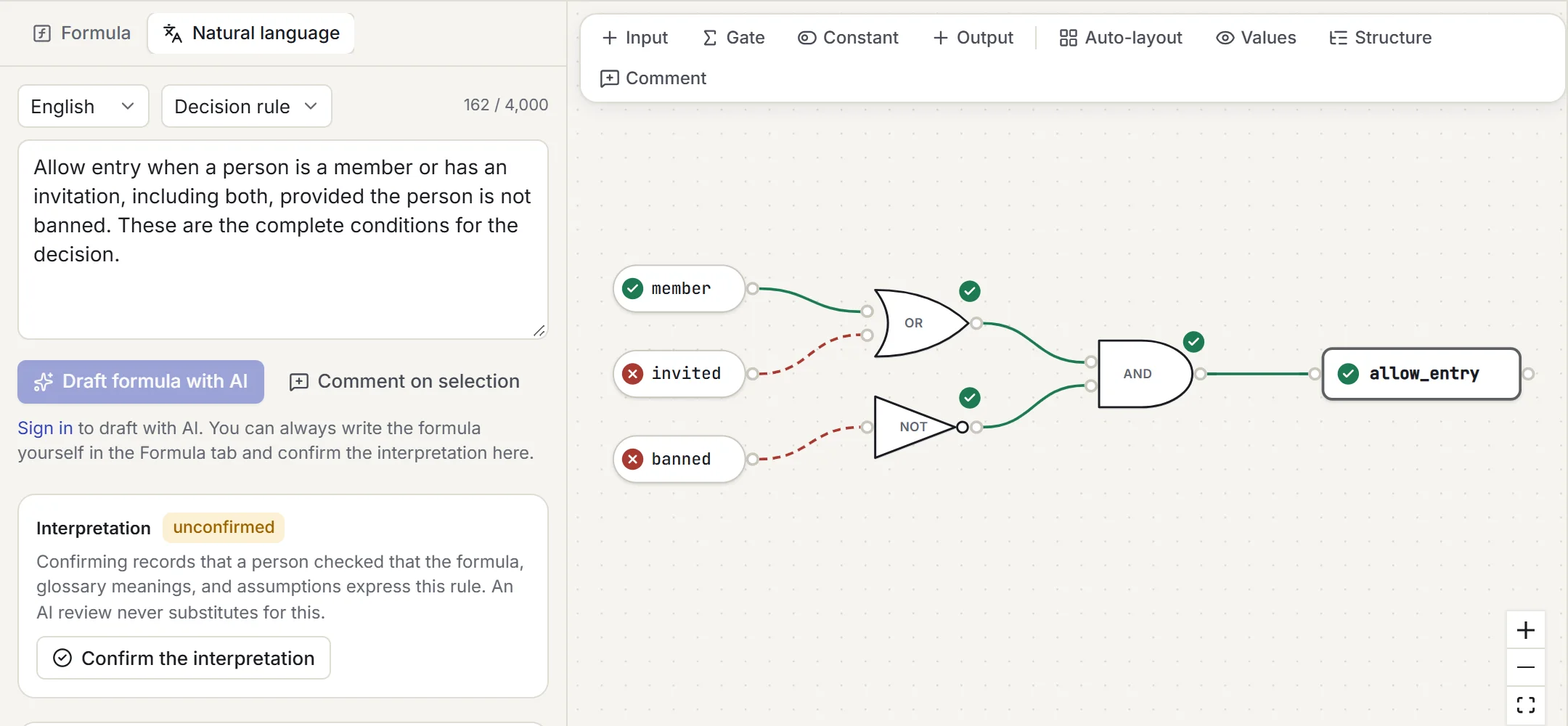
Write rules in English, French, German, or Spanish, in Decision or Argument mode. Ambiguity comes back as concrete choices: for “A or B and C” you see (A OR B) AND C, A OR (B AND C), and a case where they differ.
Programming (AND, &&, !), mathematical (∧ ∨ ¬ → ↔), or textbook (A·B, A+B, overbars, indexed minterms). They all compile to the same model, and AB is always one name, never a hidden AND.
Inputs, constants, and every supported gate, with labelled ports, zoom, pan, and auto-layout. A keyboard-operable structure view sits alongside, so nothing depends on dragging.
Give every input a human meaning, and state constraints explicitly. Tangibool never assumes that “premium member” implies “member” unless you add that assumption yourself.
Save a selection as a named, versioned subcircuit with typed ports. Each instance is pinned to a version and never upgrades silently; expand it to see the values inside. Keep libraries for yourself or your team.
Undo and redo everywhere. An invalid draft never overwrites your last valid model: it stays visible, clearly labelled as the previous valid revision, until you fix the errors in your current text.
Check
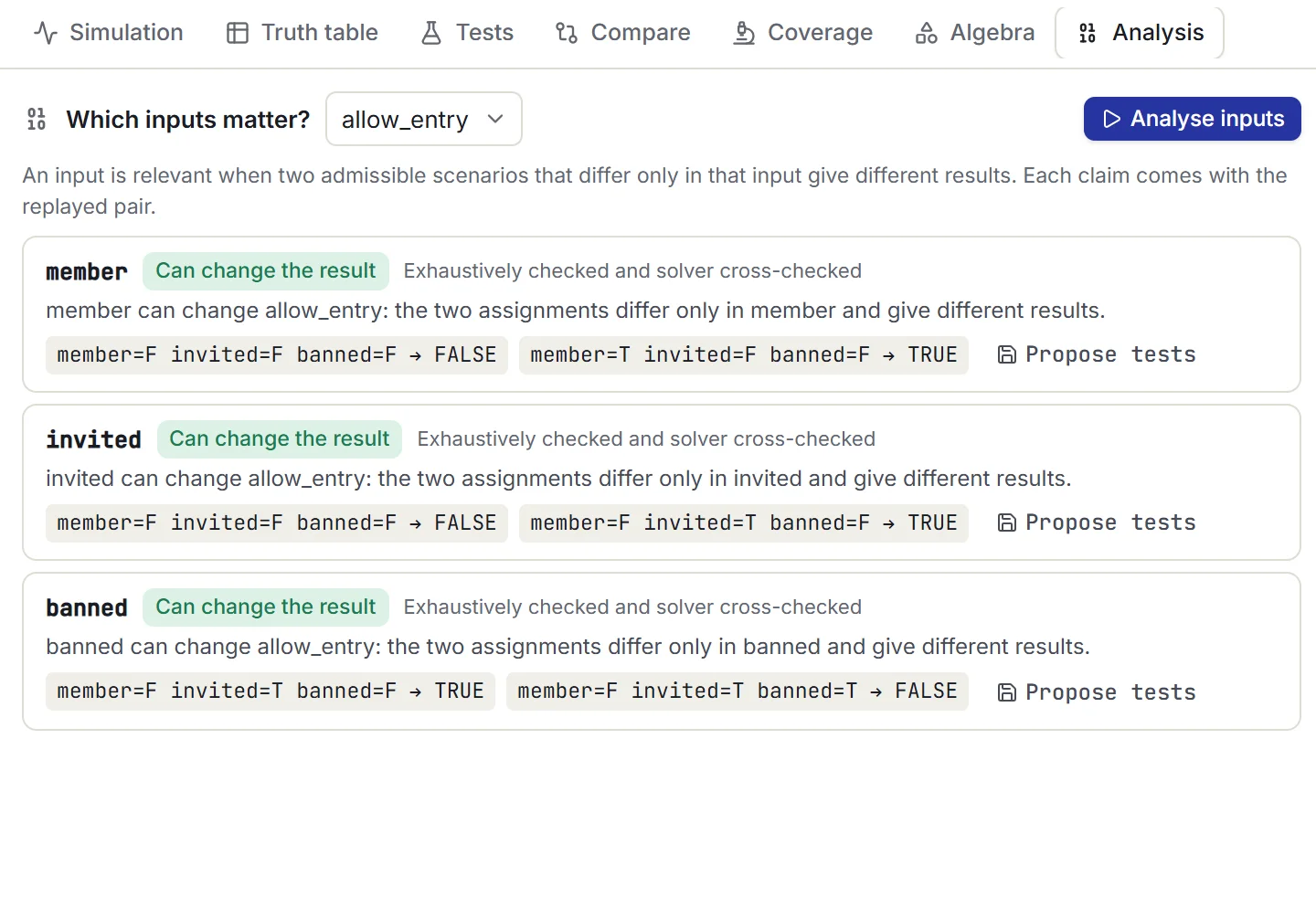
Ask a precise question and get a precise answer: holds or doesn’t, with the assignment that proves it. Every result states the property checked, the assumptions, the method, and the revision it applies to.
Can this be true? Is it always true? Can it ever be false? Are these two equivalent? Does the conclusion follow? Each is a precise satisfiability query, not a guess.
Every counterexample and witness is re-run in the evaluator before it’s shown. Load it into the simulation or save it as a regression test in one click.
Assumptions are tested for consistency before anything else. An impossible set of assumptions can never produce an “all tests pass” or “equivalent” badge.
State premises and a conclusion. Get “valid”, or the assignment where every premise holds and the conclusion fails. Premises that contradict each other get a prominent warning, not a hollow success.
See whether each input can change a result, proved with two assignments that differ only in that input. Find out whether a premise already follows from the others.
When assumptions or premises can’t all hold, Tangibool returns a checked conflicting subset mapped back to your original clauses, and says plainly what wasn’t tested.
Small models are checked over every assignment in your browser and cross-checked by a SAT solver. Larger ones use a bounded solver query on the server, with a two-second default budget, and only after you agree to send the model.
Explain
Every formula gets a literal reading generated by the engine, not by AI, so it is exactly as precise as the logic. Toggle a scenario and an evaluation trace explains why each gate is TRUE or FALSE.
allow_entry is true exactly when both of the following hold:
member (“the person is a member”) or invited (“the person has an invitation”) is true (both may be true)banned (“the person is banned”) is falseIn every other case, allow_entry is false.
Why · evaluation trace
Test
Simulate scenarios, see the complete truth table, save tests with their provenance, and find out how good those tests really are. Then run the same suite in continuous integration.
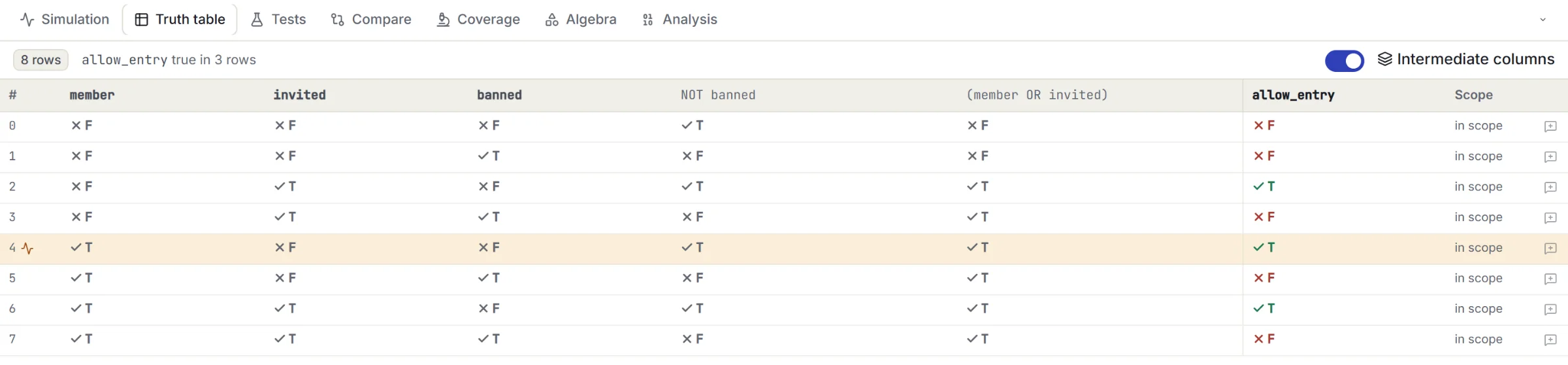
Toggle inputs and watch values flow through the diagram. An input you haven’t set has no value and is never quietly treated as FALSE.
Save scenario and property tests with notes. Each expectation records where it came from: Independent when a person confirmed it, Exploratory when it was copied from the formula itself.
Rerun after every edit. Results from older revisions are marked stale, newly failing tests are called out, and the failing path is traced on the diagram.
Input-value, gate-output, and decision-outcome coverage, plus input influence shown by paired scenarios. Every metric publishes its denominator and what it left out.
Up to 500 seeded single-edit mutants: AND↔OR swaps, negations, substitutions, and removed clauses. Equivalent mutants are found by exact comparison, and the score never hides what it excluded.
The tangibool command runs the same engine on exported packages, with JSON and JUnit reports. Exit code 0 only when at least one applicable test ran and all of them passed.
Mutation testing makes small deliberate mistakes in your rule and checks whether your saved tests notice. A surviving mutant comes with the scenario that tells it apart, ready to become your next test.
The score is killed ÷ (killed + surviving). Equivalent, invalid, out-of-scope, and undetermined mutants are shown separately, and an empty denominator is never reported as 100%.
tangibool test project.json --revision main \
  --junit reports/tangibool.xml --json reports/tangibool.json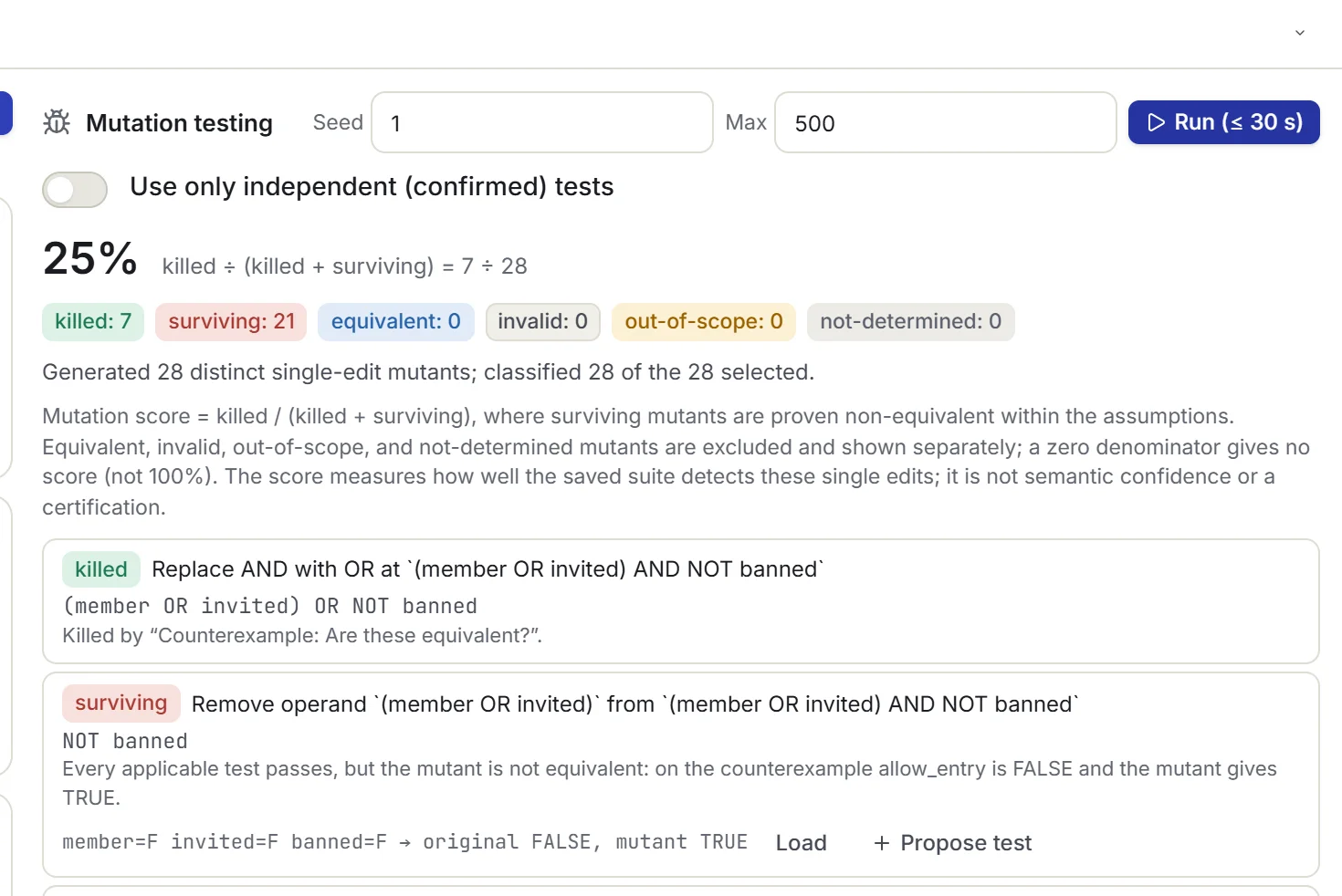
Algebra
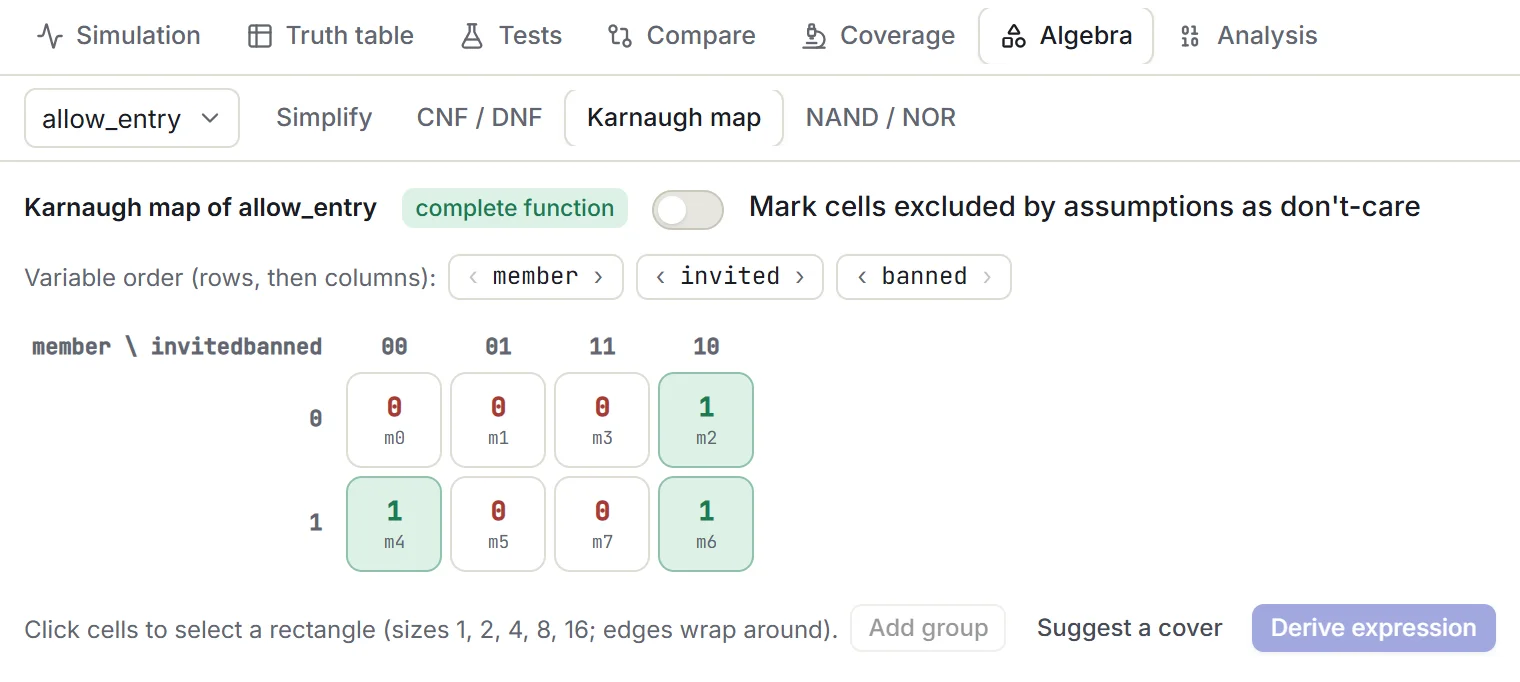
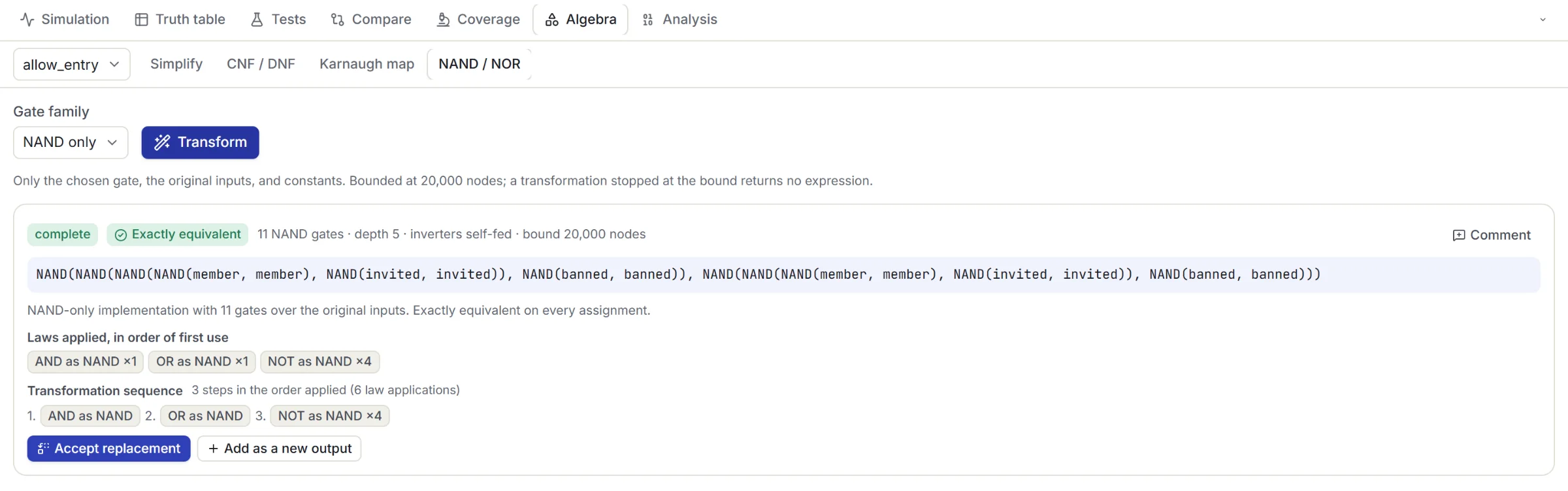
Every transformation shows its scope, size, and an exact equivalence result before you accept it. Your original stays editable until you choose the replacement.
History
Not a Git wrapper: native history that understands rules. A commit captures the logic, wording, glossary, diagram, assumptions, tests, and shared notes together, so an old formula can never be paired with a newer diagram.
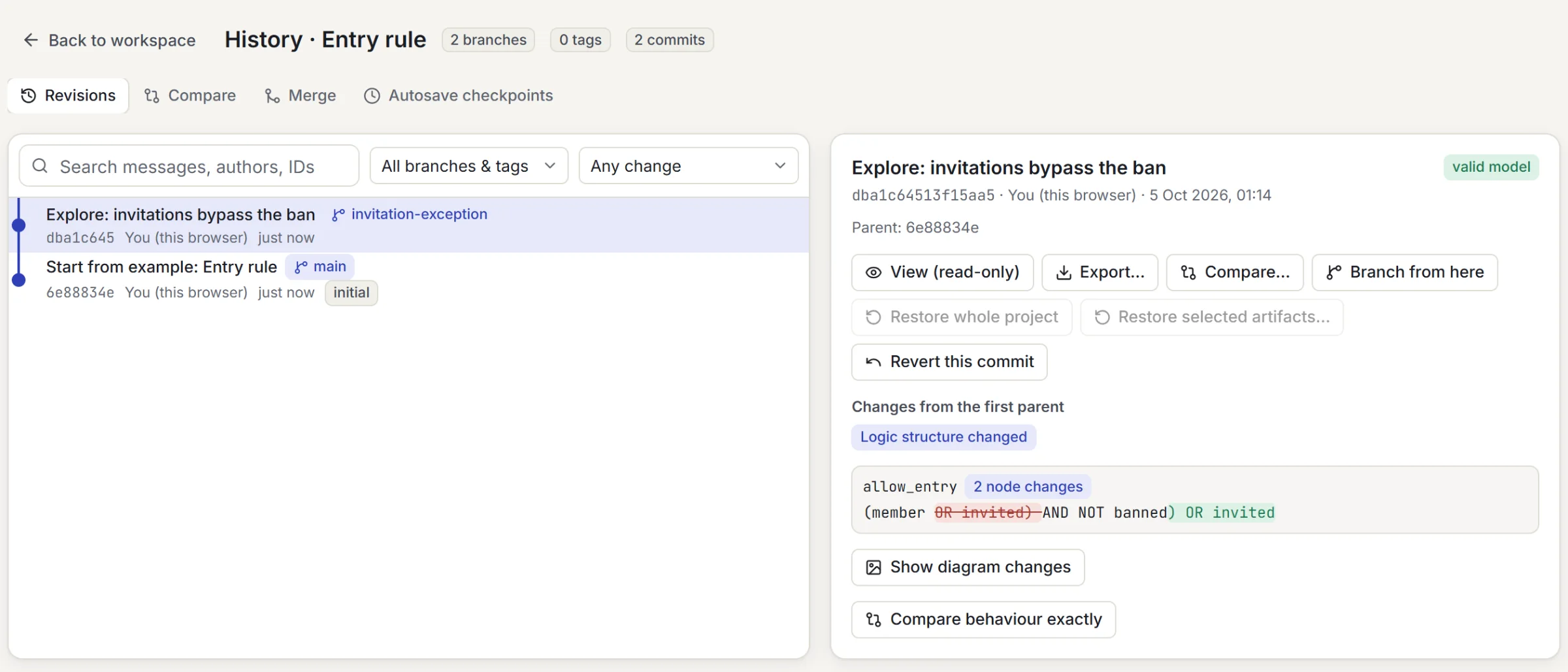
Explicit commits with messages, plus recoverable autosave checkpoints kept for 30 days, even for invalid drafts. Promote any checkpoint to a named commit.
Branch to explore an exception without touching the original. Tags name a fixed commit; an approved-baseline tag also requires current checks and a confirmed interpretation.
Text, structure, visual layout, and behaviour are compared separately. A formatting change, an equivalent refactor, a scope change, and a behaviour change each get their own label.
Compatible edits combine. Conflicting ones, such as changes to the same operator, connection, meaning, test expectation, or note, are shown for review. Relevant checks rerun before you commit the merge.
Open merge requests, require approval from an independent reviewer, and protect important branches with mandatory current checks. Rules are enforced on the server.
Restore a whole project or selected artifacts, with dependencies resolved first. A restore is always a new commit, and later comments and notes are never rolled back.
History, branches, and comparisons work offline in local projects. No Git account or external repository is needed, and exported files are deterministic, so you can keep them in your own repository too.
Collaborate
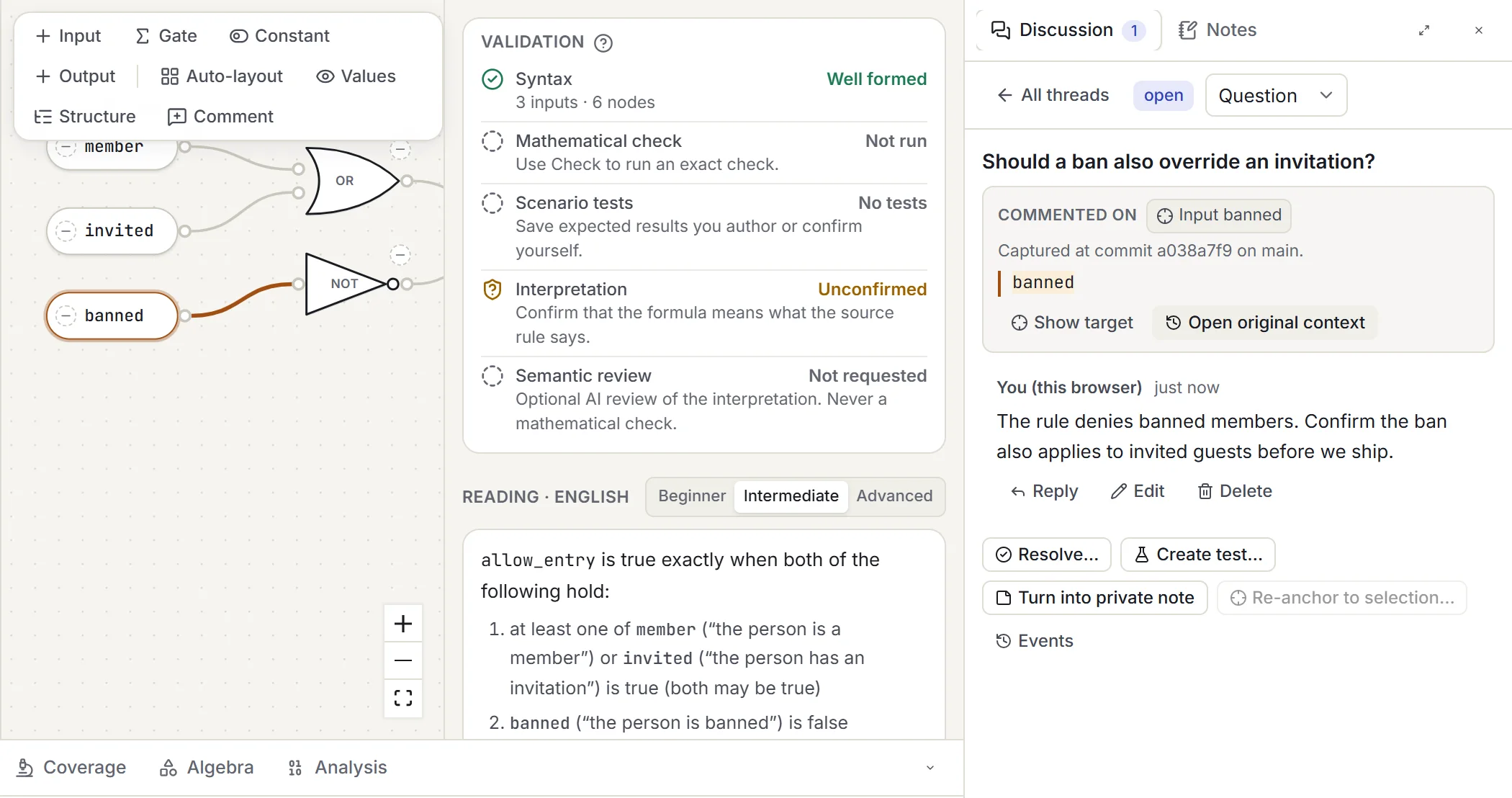
Comment on the exact thing you mean: a formula fragment, a gate, a clause, a test, or a revision. If the logic changes later, the comment says so instead of silently attaching itself to something new.
Sign in and copy a local project to your personal or team cloud. Edit offline and sync later; concurrent edits are kept side by side for an explicit merge, never overwritten.
Owner, admin, editor, commenter, and viewer. Commenters can discuss but not edit logic; viewers can read. Private notes stay private, even from owners and admins.
Share a fixed, read-only snapshot that never follows later edits. Links are private until you grant access, and they can be revoked or set to expire.
Configure the optional AI review with your own questions and thresholds, covering omitted conditions, exception scope, or a reversed “only if”. Versioned, and never a substitute for confirmation.
Keep shared terms, synonyms, and confirmed domain assumptions in one versioned glossary. Changing a term withdraws the approvals that depended on it.
Publish subcircuits to a team library. Projects stay pinned to the version they use until someone reviews and approves the upgrade.
Export
Export a single artifact, a selection, or everything from one pinned revision, so a package can never mix an old formula with a newer diagram. Exports run in your browser, never call AI, and never change the project.
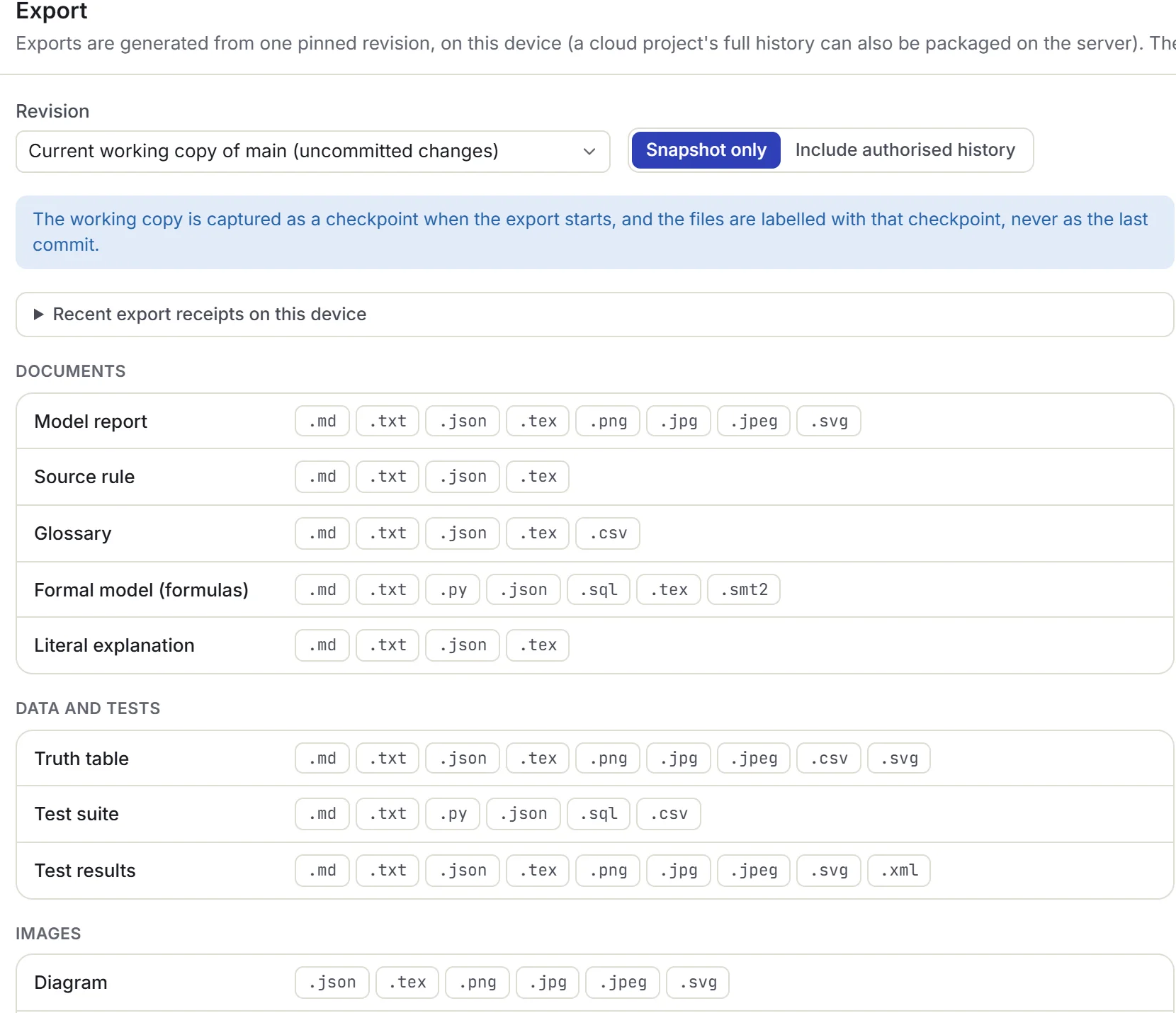
| Format | What you get |
|---|---|
.py | A readable Python 3 evaluator and a unittest suite, with strict Boolean input checks: strings, numbers, and None are rejected, never coerced. |
.sql | A PostgreSQL Boolean expression with a read-only SELECT and a VALUES test harness. Missing or NULL inputs are reported as invalid, never silently treated as FALSE. |
.smt2 | SMT-LIB Boolean definitions and scoped satisfiability queries, with each sat / unsat outcome explained. |
.tex | LaTeX fragments or standalone reports: formulas, truth tables, algebra steps, and TikZ diagrams and Karnaugh maps. |
.md · .txt | Readable reports: source rules, explanations, glossary, tests and results, transformations, comments, and notes. |
.json | The lossless native format: a project snapshot or a full-history package you can import again. |
.png · .jpg · .jpeg · .svg | Diagrams, truth-table pages, maps, and report cards, at the size, scale, and theme you choose, with real JPEG data under either extension. |
.csv · .xml | Truth tables and scenario suites as CSV, with spreadsheet-formula injection neutralised; JUnit-compatible XML test reports. |
Generated Python, SQL, and SMT-LIB are produced from tested templates, never by AI, and are cross-checked against the engine on thousands of generated models before every release. Exporting code does not run it.
Learn
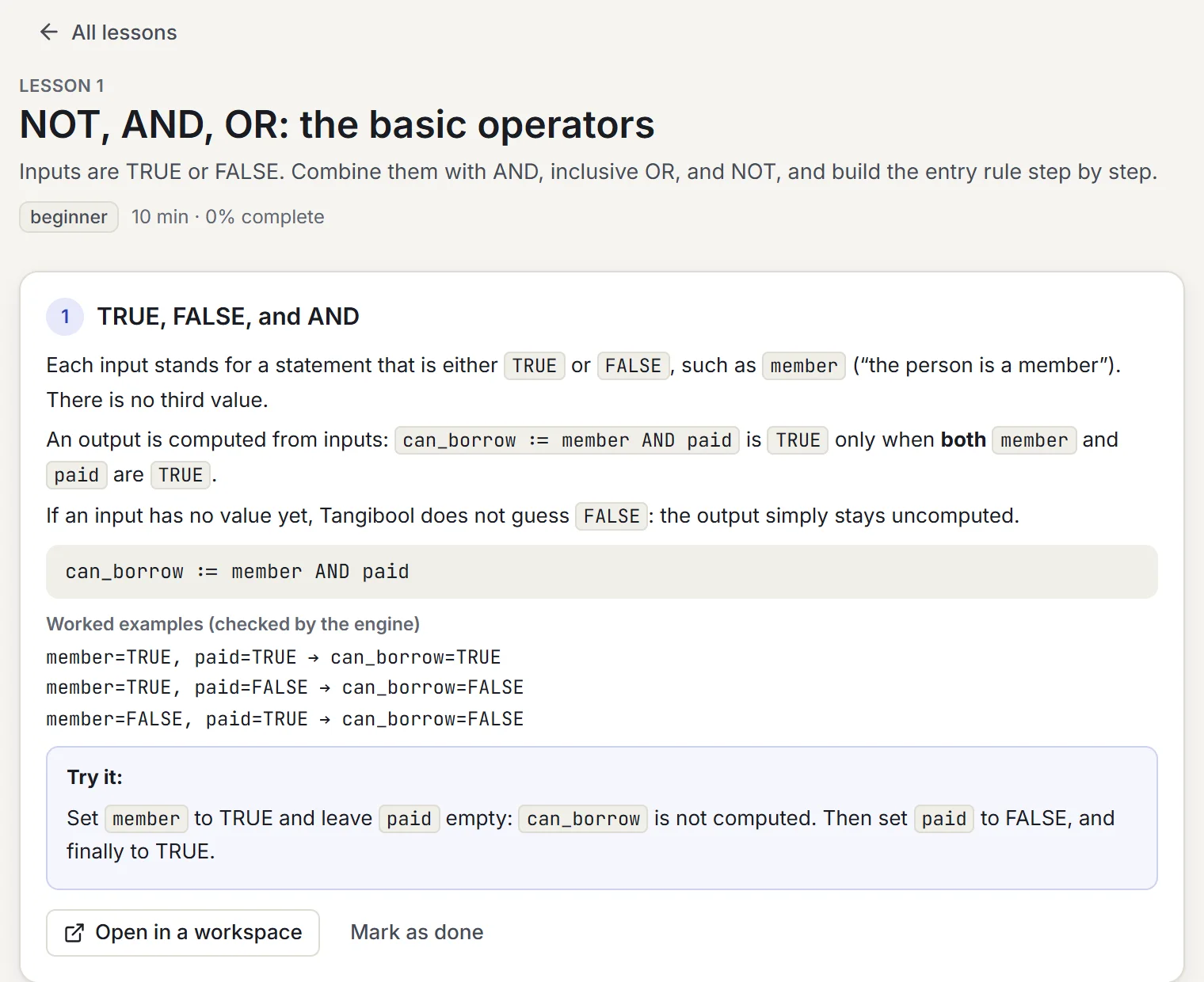
Every lesson opens real workspace models checked by the same engine, not disconnected illustrations. Exercises give concrete feedback with replayable scenarios, in all four content languages. Progress is saved on your device, and in your account when you sign in.
Honest by design
Trust comes from saying exactly what was checked, and what wasn’t. These rules are built into every result, report, and export.
A check that exceeds its budget says “Not determined”. It never turns into a green tick.
Change the logic, assumptions, or tests and earlier results say which revision they belong to and can’t be applied.
An argument whose premises contradict each other is “valid” only vacuously, and you’re told so prominently.
Unsatisfiable results are labelled “solver-checked”. Tangibool doesn’t claim independently verified proof certificates.
A simplification is better by the objective you chose, such as fewer operators. It’s never called “the smallest possible”.
Structural coverage and mutation scores measure your tests. They’re never presented as proof the rule is right.
No AI confidence is ever shown as a mathematical guarantee, and no AI output is accepted without you.
Tangibool verifies the model you supply, not the real-world truth, legality, completeness, or safety of a policy.
Operating limits
These bounds keep every operation fast and exact. They apply to every plan and describe supported sizes, not features you have to unlock. Anything beyond them fails clearly instead of returning a partial result dressed up as a complete one.
Tangibool works with two-valued Boolean logic and propositional logic. It doesn’t evaluate numbers or text: a condition such as “age is at least 18” becomes a Boolean input like age_at_least_18 that you confirm.
| What | Limit |
|---|---|
| Distinct inputs per model | 64 |
| Expression nodes (after expanding subcircuits) | 500 |
| Nesting depth | 64 |
| Truth table, automatic | 8 inputs · 256 rows |
| Truth table, on request | 12 inputs · 4,096 rows |
| Karnaugh maps | 0–4 inputs |
| CNF / DNF size | 4,096 clauses · 20,000 literals |
| Mutation run | 500 mutants · 30 s |
| Server solver budget (default) | 2 s per query |
| Saved tests per model | 1,000 |
| Natural-language drafting request | 4,000 characters |
| Note · comment | 50,000 · 10,000 characters |
| Export archive | 100 MiB · 10,000 files |
| Images | 8,192 px per edge · 32 MP |
FAQ
No. Open the app and start working: projects, history, tests, notes, lessons, and exports all work signed out, stored in your browser. Sign in when you want cloud sync, teams, sharing, merge requests, or AI drafting. Browser storage is not a cloud backup, so export or copy important projects to the cloud.
Never. AI can draft a formula from your words, suggest clarifications, paraphrase an explanation, or review a draft for likely omissions. Every mathematical result comes from the deterministic engine, and only you can confirm what a rule is meant to say. You can switch AI off entirely and keep every deterministic feature.
For larger models Tangibool runs a bounded SAT query on the server, but only after telling you that the model will be sent. If the query finishes, you get an exact answer; if it runs out of budget, the result is “Not determined”. It never presents a sample of scenarios as a complete check.
Not directly: Tangibool works with two-valued Boolean and propositional logic. A condition like “age is at least 18” becomes a Boolean input such as age_at_least_18, which you confirm. Relationships between conditions, for example that “premium member” implies “member”, are added as explicit assumptions.
Yes. Export the project as a native JSON package and run it with the headless tangibool runner, which uses the same engine as the browser. It writes JSON and JUnit-compatible reports and exits with 0 only when at least one applicable test ran and all of them passed, 1 when an assertion failed, and 2 for invalid or inconclusive input.
For your rules, it doesn’t need it: commits, branches, tags, diffs, merges, and restores are built in and understand logic, diagrams, and tests. Because exports are deterministic, you can still keep the generated files in your own Git repository if you like.
It is designed to the WCAG 2.2 AA standard. Every diagram action has a keyboard alternative, a structured view sits alongside the canvas, controls are labelled for screen readers, and truth values always use an icon and a word, never colour alone. Automated WCAG 2.2 accessibility scans of the main pages and dialogs are part of the test suite, in both light and dark themes.
Current versions of Chrome, Edge, Firefox, and Safari. Tangibool is desktop-first, and on tablets and phones the same features are arranged in tabs rather than squeezed onto one screen.
Paste a condition from your codebase or a sentence from a policy, and find out exactly what it does.